

Ready to Elevate Your Product Experience ?
Whether you're launching a new product or refining an existing digital product, I'm here to help. Share the details about your project and I'll get back to you to work something out.
Healthcare Staffing · B2B
Applications and open roles are pulled in automatically, scored, and
credential-checked. Recruiters work them from either end, a job looking for
a nurse or a nurse looking for a job, and both end at one submission.
Role
Product Designer
PLatform
B2B Enterprise Web App
Status
Shipped (2025)
Industry
Healthcare Staffing
FlexCare is an AI-powered recruitment platform built for healthcare staffing agencies to streamline the hiring of travel nurses. By automating candidate qualification, credential verification, and intelligent job matching, it enables recruiters to focus on faster, more confident hiring decisions while retaining full control over the recruitment process.



Healthcare staffing is a race against time. Recruiters often manage hundreds of travel nurse applications while juggling license verification, credential checks, job matching, and candidate communication. Most of this work is repetitive and manual, leaving less time for evaluating the right candidates.
TASK FLOW
Recruiters here work from both ends, often on the same afternoon.
Job to candidate. A facility they have a relationship with posts a role, and they go looking for a nurse.
Candidate to job. A nurse's contract is ending, and they go looking for the next placement.
Both end in the same action, a profile submitted to the client. So the product is built as two entry points into one submission, with a single approval gate in front of the candidate side.
Jobs come in ungated and unscored. Candidates do not. Every nurse passes a recruiter's approval before entering the pool that matching runs on.

Instead of replacing recruiters, AI supports them throughout the recruitment journey by handling repetitive tasks and surfacing insights before human review.
Extracts and structures candidate information
Generates AI-powered candidate summaries
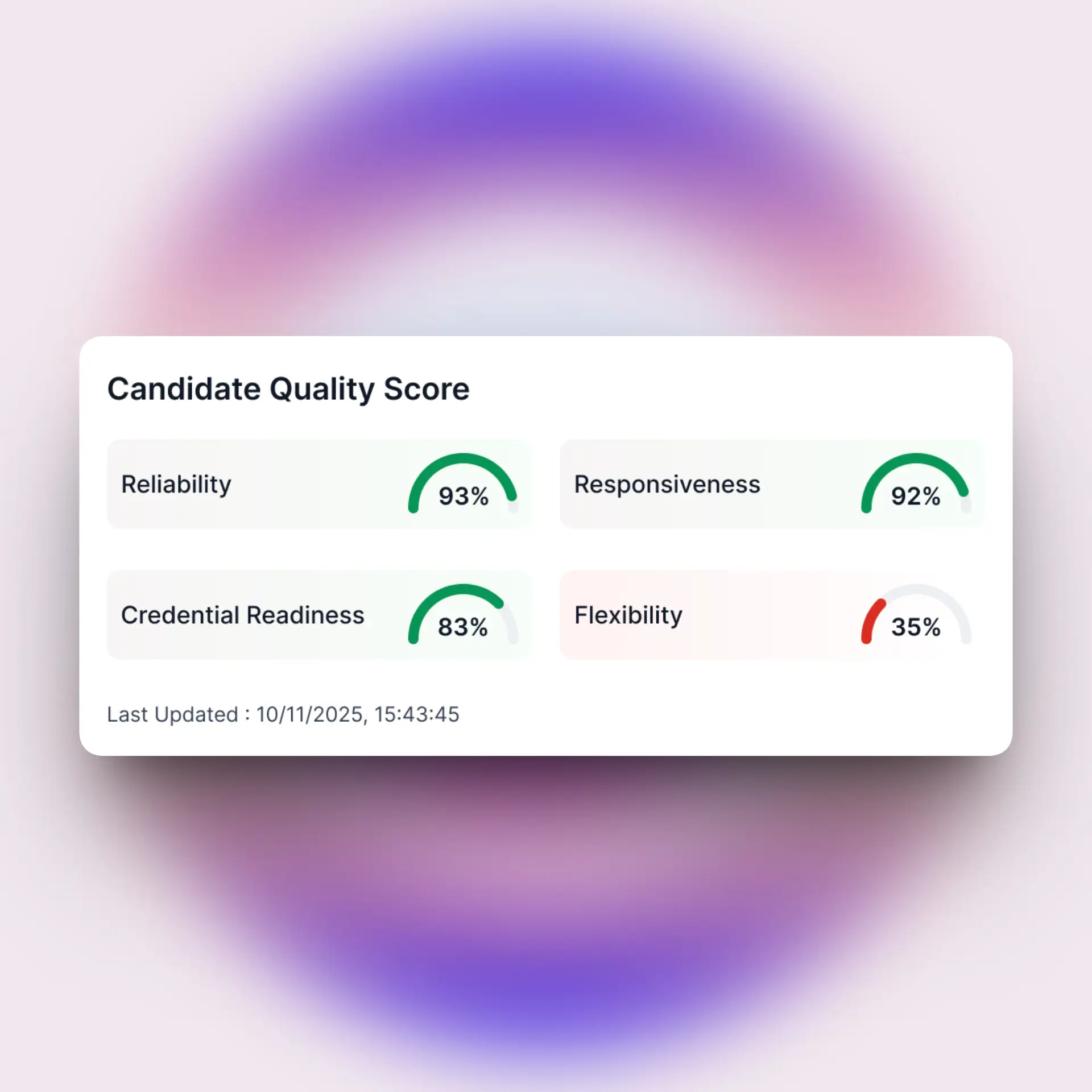
Provides transparent scoring to support recruiter decisions
Validates licenses and credentials
Recommends best-fit candidates for open roles
Reduce repetitive analysis while preserving recruiter accountability.
Automation trade-offs
The question was never whether the AI should do a thing. It was how much of it, and what the recruiter got back in exchange. I made those calls myself. The only thing I took to the PM was whether something could be built inside the architecture they already had.

The AI does the reading at the front and the ranking in the middle. Every point where something actually happens to a nurse is a recruiter.
Both sit under Candidates Overview as two tabs, one continuous path from arrival to working set.
AI Intake Queue. Pulled applications land here already parsed, scored, and credential-checked. The row carries verification status, AI match score, specialty, certifications, location, and when the intake arrived, so a recruiter can approve straight from the table or open the full profile first.
Candidate Pool. The approved working set. Specialty, certifications, current status, assignment count and success rate, and availability with days remaining on the current contract, which is the field that tells a recruiter who needs attention this week. Matching Jobs on every row is the entry into the candidate to job direction.
The AI analyses one side against the other and returns a ranked list with the reasoning attached.
Job to candidate. From an open role, nurses are ranked against that job's requirements. Each result carries a match score, the qualifications met, and current availability. Submit, dismiss, or open the profile.
A score is never shown on its own. The requirement checklist sits beside it, and gaps on the lower ranked options are listed, so a recruiter can read down the ranking without opening every one.
Candidate to job. From a nurse, open roles are ranked by fit and grouped into strong, partial, and weak. Selecting one opens its pay, shift, duration, start date, and the gap analysis behind the score.
The same screen serves both flows, with the question and the action swapped.
Opened from intake it answers how strong this nurse is generally, and the action is Add to Matching Pool.
Opened from a job it answers how strong this nurse is for that job, with the job named in a bar at the top, and the action is Submit Candidate.
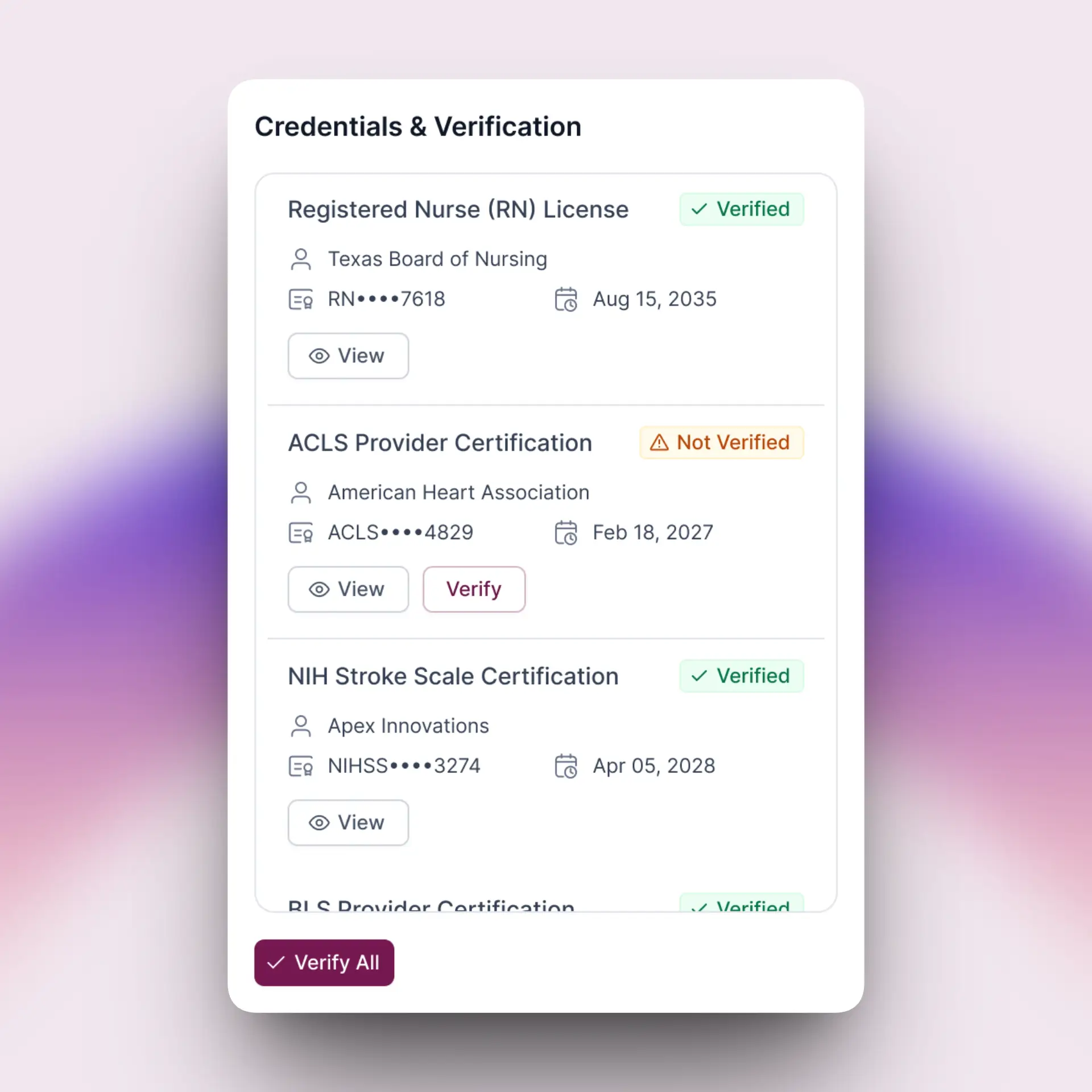
The contents stay the same either way: match score, profile completion, AI confidence and verified items across the top; an AI clinical assessment and verified credentials down the left; and below that, completed items on one side against action required on the other, so what is done and what is outstanding sit side by side.
Assignment history carries facility feedback and ratings from previous contracts, which is the part of the picture the AI did not generate.
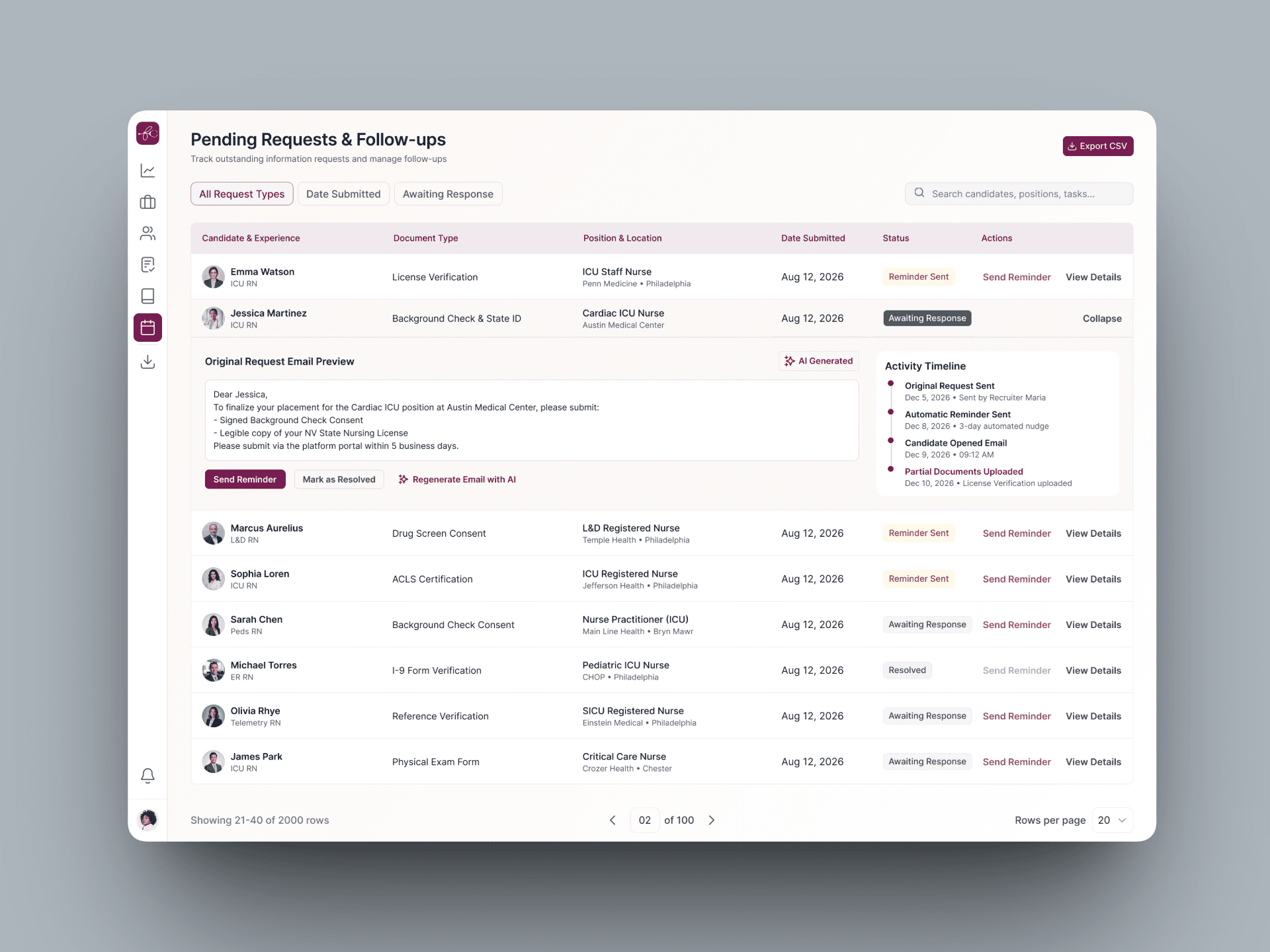
When a credential, an availability confirmation, or a consent is outstanding, the recruiter cannot fix it themselves. The nurse has to supply it. So the product drafts the message and hands it over.
Request Missing Info opens a pre-written email addressed to the candidate, listing exactly the items that are missing. It can be edited, regenerated, or sent as is. Individual items in the action required panel also carry their own email, call, and message shortcuts.
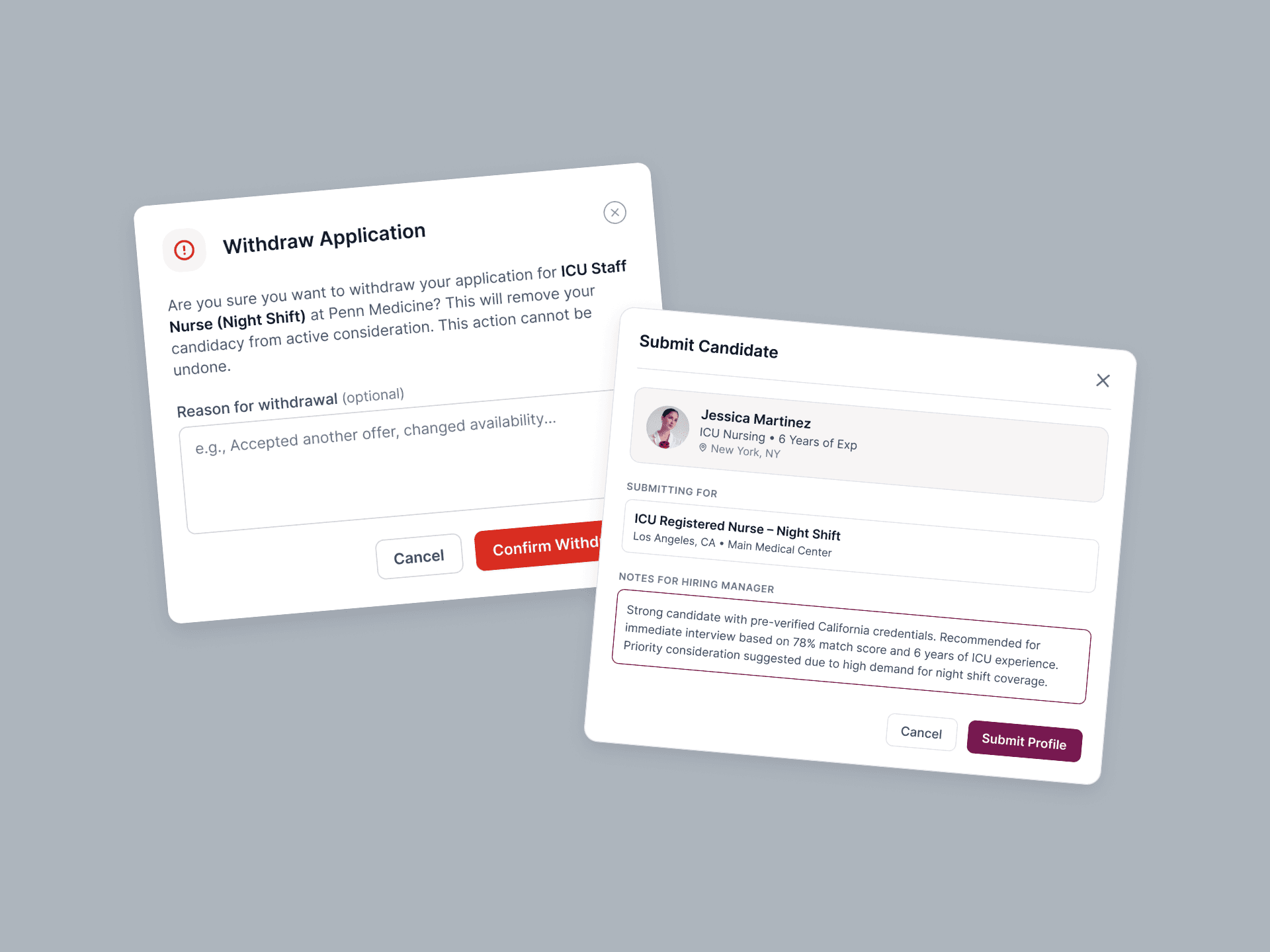
Submit opens a confirmation carrying the candidate, the job, and a pre-drafted note to the hiring manager that summarises why this nurse fits. The recruiter edits it before sending. Dismiss declines the AI's recommendation of a candidate for a job. Withdraw pulls a live submission back with an optional reason. Both are reversible.
Once sent, submissions are tracked in two places:
Per candidate, inside the nurse's profile, because a recruiter working one person needs to know where else that person is already out, and at what rate.
Org-wide, in All Submissions, with the owning recruiter on every row, status distribution across the platform, and CSV export.
I had no access to recruiters at any point. My only channel was my Product Manager, who carried the requirements and the domain knowledge and acted as my proxy user.
To compensate, I studied how recruitment platforms outside healthcare handle AI assistance, to understand which patterns users already expect and which ones I would have to justify.
Timeline was two weeks, with the PM as the single reviewing stakeholder.
Human-in-the-Loop AI
AI assists, recruiters decide.
Explainable AI
Recommendations are supported with transparent reasoning.
Reduce Repetitive Work
Automate operational tasks, not decision-making.
Decision-First Design
Every screen helps recruiters answer the next question quickly.
I moved to another project shortly after handoff, so I don't have adoption metrics or placement data.
What I do have is the client's feedback. After reviewing the platform, the FlexCare client said,
This is what I wanted.
The Product Manager called me afterwards to share how happy the client was with the design and the overall workflow.
Thank you!
Whether you're launching a new product or refining an existing digital product, I'm here to help. Share the details about your project and I'll get back to you to work something out.